Equipment and thermostats
Everything that makes a system run: the thermostat that decides, the equipment that heats or cools, and the signs that show what's going on.
Systems
A system is a thermostat and everything linked to it with the link tool: any number of heat pumps, air conditioners or furnaces, the vents, one settings panel and any number of RPM monitors. A system has no name of its own: it goes by its thermostat's.
A system conditions either air (a room, through iron trapdoor vents) or water (a pool, through waxed copper grate vents), never both. See Vents and airflow.
The link tool
/hvac link-tool ("duct-tool", "sensor-tool" and "tool" give it too)
- Right-click a thermostat to select it. The tool remembers it, even after a relog.
- Right-click a dispenser, an iron trapdoor or waxed copper grate, a settings panel or an RPM monitor to link it to that thermostat.
- Sneak-right-click anything to unlink it. Sneak-clicking the thermostat itself unlinks it from its system.
The same tool links sensors to a sensor hub: select the hub instead. See Sensors.
- Creating with the tool in hand: a device you create while holding the tool, with a thermostat selected, is linked straight away.
- Another thermostat's devices are never taken. Linking something that belongs to a system with its own thermostat is refused, and the message says where that thermostat is. Unlink it first.
- Headless systems: when a thermostat is broken or removed, its system stays together, idle: the equipment, vents and signs remain linked to each other. Linking a new thermostat to any part of it brings the whole system along. A unit created on its own, or unlinked, is a headless system of one.
- Air or water: a system can't mix the two. Linking a boiler, a pool heat pump or a waxed copper grate makes its thermostat a pool thermostat; linking air equipment or an iron trapdoor makes it a room thermostat again.
Removing a whole system
Hold the link tool, look at any part of the system and run:
/hvac remove system
It says what it would remove. Run /hvac remove system confirm within 15
seconds to unregister every device of that system. Equipment takes its water
or lava away, as with /hvac remove. The blocks themselves stay.
Thermostats
/hvac create thermostat <label> [target]       look at a sign
/hvac create poolthermostat <label> [target]   look at a sign ("pool" works too)
- Thermostat: controls an air system. Targets 60-85 °F, 72 °F if you leave it out.
- Pool thermostat: the same sign for a water system. Targets 75-104 °F,
82 °F by default. A thermostat becomes one by itself when you link a
boiler, a pool heat pump or a grate to it; a target still at 72 °F moves to
82 °F.
poolthermostatjust starts it in the pool range. A room thermostat never controls water equipment, so it can't heat a room to 104 °F. - Labels are 1-32 letters, numbers,
_or-, and may repeat: every house can have a Home./hvac rename <label>changes it. A system has one thermostat.
The thermostat sign
EZvac | Home
74.2 F | COOL
Set 72.0 F | 68%
ETA 0:31 | 2/3
| Line | Shows |
|---|---|
| 1 | The thermostat's name |
| 2 | Room temperature and mode: COOL, HEAT, IDLE or OFF |
| 3 | The target, and while it runs the system's load: how hard it's working, 0-100% |
| 4 | Time until the target is reached (Ready when idle), and how many of its units are running |
- Change the target from the menu the sign opens on a right-click (+5, +1
and +0.1 on the left, the same down on the right), or with
by looking at the sign and running
/hvac thermostat set <temperature>. - Sneak-right-click the sign to switch the whole system off (the sign
shows
System off) and again to switch it back on. Units you switched off on their own stay off. - The load is what the system delivers now as a share of what its units could deliver flat out, in its current profile. 100% means everything that can run is at full speed, however many units it has and whatever their tiers. Near the target it falls as the compressors slow down.
- The ETA uses the same equipment, speeds, profile and outdoor load as the real controller.
How it decides
- Cooling starts 1 °F above the target and stops 0.3 °F below it; heating starts 1 °F below and stops 0.3 °F above.
- Once on, equipment runs at least 15 seconds; once off, it waits at least 10.
- With nothing running, a room drifts toward the outdoor temperature.
- A thermostat in an unloaded chunk, switched off, or with no equipment simply idles, and its room keeps drifting without loading the chunk.
All of these are in Configuration.
Equipment
Every piece of equipment is a dispenser. Look at it and register it, then link it to a thermostat with the link tool:
/hvac create heatpump [t1|t2|t3]
/hvac create ac [t1|t2|t3]
/hvac create furnace [t1|t2|t3]
/hvac create boiler [t1|t2|t3]
/hvac create poolheatpump [t1|t2|t3]       ("poolhp" works too)
The tier is optional, and two-stage (t2) when you leave it out; see
Tiers.
| Equipment | Cools | Heats | Speed | Output while running | System |
|---|---|---|---|---|---|
| Heat pump | yes | yes | variable | water | air |
| Air conditioner | yes | variable | water | air | |
| Furnace | yes | fixed, full | lava | air | |
| Boiler | yes | fixed, full | water | water (pool) | |
| Pool heat pump | yes | yes | variable | water | water (pool) |
- Equipment needs no fuel, water, power or items. The dispenser's contents and redstone are ignored.
- More units heat or cool faster, with diminishing returns (at most twice one unit).
- Near the target, equipment slows down as its tier allows: a variable unit eases down, a two-stage one drops to its low stage, a single-stage one stays flat out.
- A pool heat pump can share a pool system with a boiler.
Tiers
Every piece of equipment has a tier, shown as stars: the three kinds of real HVAC units. More stars is better.
| ★☆☆ Single-stage | ★★☆ Two-stage | ★★★ Variable-speed | |
|---|---|---|---|
| Near the target | stays flat out, then stops | drops to its low stage, 65% | eases down smoothly, to 40% |
| Capacity flat out | 70% | 85% | 100% |
| Furnaces and boilers | flat out or off | 65% low stage | modulating, 40-100% |
- Far from the target every tier runs flat out, so how fast a room cools or heats depends on capacity: the cheaper kinds are the budget models and deliver less.
- Near the target is where they differ. A single-stage unit keeps blasting, overshoots, stops, and starts again when the room drifts back. A two-stage unit finishes on its low stage. A variable unit throttles down to the load and settles. So the better the tier, the steadier the room and the fewer the starts.
- Every unit from before 3.1 is ★★★, at the full capacity it always had: compressors run exactly as before, and furnaces and boilers now modulate near the target.
- New units are two-stage unless you name a tier:
/hvac create heatpump t3(t1-t3,1-3,single,two-stage,variableandmodulatingall work). Change it later by looking at the unit and running/hvac equipment tier <t1|t2|t3>. - Tiers mix freely in one system: each unit runs as its own tier does.
- Where it shows:
/hvac info, RPM monitors, and the messages when you create or change a unit. The numbers are in Configuration.
Sizing
New in BETA 1.0. Equipment heats or cools the air its system reaches, so a bigger building needs more of it.
- One ★★★ unit per 1,860 blocks of air, counting every level: a floor of about 465 blocks, 4 blocks high. A ★★ unit counts as 0.85 of one and a ★ unit as 0.70.
- Units add up: a building of 11,160 blocks of air needs six ★★★ units, or more of the cheaper tiers. Sized right, a system reaches its target as fast as one unit in a normal house always has, a few minutes on a hot or cold day.
- Too few is slower: with a third of what it needs, a system heats or cools at about a third of the pace. On a very hot or cold day it may never get there. Its screen counts it beside its ⚠, and its menu says what it has of what it needs, in ★★★ units (BETA 1.0 Pilot 2; the screen said Undersized 1/3 in Pilot 1).
- The profile counts: on Eco a heat pump or AC counts for 70% of its unit, on Turbo for a little more. A system sized right on Normal can be short on Eco; its menu then says Normal would keep up.
- A small room is quicker, up to twice the pace.
- Pools count water instead: one ★★★ pool heater per 1,500 blocks of water.
- The size is the air the system's vents actually reach, in whatever shape: tall halls, stairwells, several floors. A bigger building also needs vents spread through it, since one vent reaches 30 blocks (How far air reaches).
- Openings leak: an open door, a window or a hole to the sky lets the outdoors in. One open front door slows a sized house by about a third to a half, and a building with open walls can hardly be heated or cooled at all. See Roofs and the outdoors.
- Neighbouring systems whose air touches, through an open doorway or a shared open space, even out with each other. A wall or a closed door keeps them apart.
/hvac infoon a thermostat shows the size in blocks, the openings, what it has of what it needs for cooling and heating, and any system its air touches.
sizing.enabled: false, or Building size in
quick settings, turns this off: any
size then heats and cools as before BETA 1.0. It's on for a new server and
starts off on one upgrading from ALPHA, so existing builds don't change
until the owner switches it on; admins are told so once. The numbers are in
Configuration.
The casing
While a unit runs, its dispenser puts a block of water (lava for a furnace) in the cell it faces, and takes it away when it stops. Since BETA 1.0 that water or lava stays in its cell: it never flows, lights fires or hardens into obsidian, so units built side by side in one casing never block each other, and a unit that starts before its casing is finished doesn't flood the build. The casing is how a unit is meant to look.
Build it however you like. The cube below is the ideal template, not a
rule. Heat pumps, air conditioners and furnaces are all the same base
structure, a dispenser with an empty output cell, and only how you create it
makes the difference: /hvac create heatpump, /hvac create ac or
/hvac create furnace on the same dispenser. What you build around it is up
to you: a brick outdoor unit, a copper box, a furnace hidden in a chimney.
EZvac only needs the dispenser and its free output cell.
The usual build is a 3×3×3 cube, three layers of 3×3, with the dispenser facing up in the middle of the bottom layer:
 bottom layer:              middle layer:              top layer:

 [casing][casing][casing]   [casing][casing][casing]   [casing][casing][casing]
 [casing][ disp ][casing]   [casing][output][casing]   [casing][casing][casing]
 [casing][casing][casing]   [casing][glass ][casing]   [casing][casing][casing]

 disp: the dispenser, facing up
 output: left empty; water (lava for a furnace) appears there while it runs
 glass: optional, any side of the middle layer, to watch it
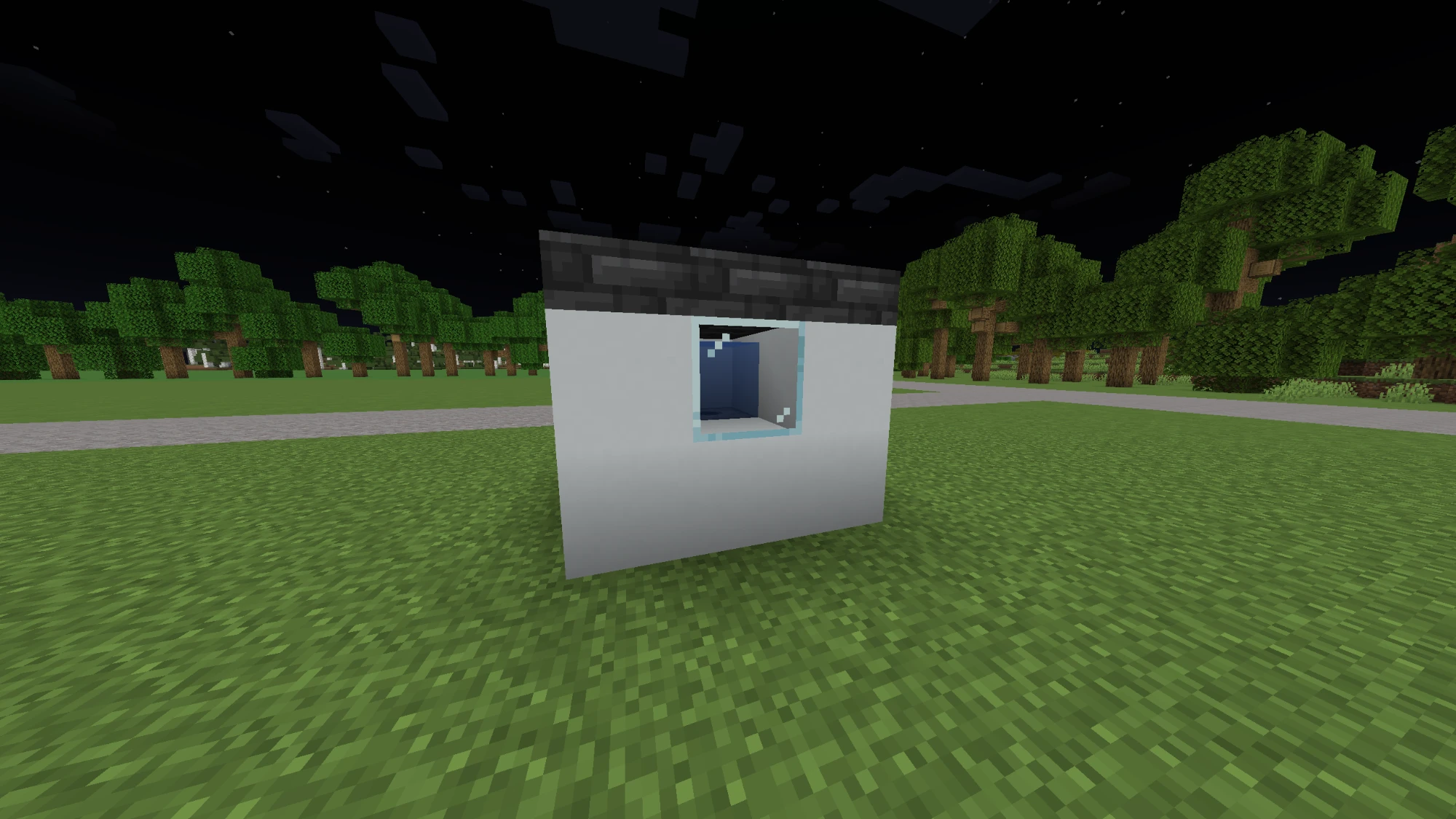
- Fill all three layers with casing blocks, except the dispenser in the middle of the bottom layer and the output cell above it, which stays empty.
- One side of the middle layer can be glass, as in the picture, to see the water or lava.
- A dispenser can also face sideways or down: its output is then the cell it faces, and that cell is the one to box in.
- The output cell must be empty for the unit to start: air, or water or lava only flowing through, which the unit replaces. A water or lava source in it is left alone, since it may be yours.
- A furnace's lava lights nothing around it, but it still burns anyone who touches it.
- The casing can be anywhere: the room is reached through the vents you link, not through the equipment.
- EZvac only ever removes the water or lava it placed itself. Fluid you put in a dispenser's output cell is never taken over.
- Two units facing the same cell take turns: one wins and the other waits.
Operating profiles
A settings panel switches a system between Eco, Normal and Turbo:
/hvac create settingspanel [label] look at a sign, then link it
Right-click the sign to move forward through the profiles and sneak-right-click to move back. A system has one panel.
The thermostat's menu sets it too (BETA 1.0 Pilot 2), so a system doesn't need a panel: click the profile at the top of the menu for the next one, right-click for the previous. A system with a panel shares it with the panel, and removing or unlinking the panel leaves the system on the profile it had.
| Profile | Default top speed | Variable-unit capacity |
|---|---|---|
| Eco | 2,400 RPM | 70% |
| Normal | 3,600 RPM | 100% |
| Turbo | 4,200 RPM | 115% |
Profiles affect heat pumps, air conditioners and pool heat pumps. Every one in the system gets the same speed. Furnaces stay at full heat in every profile.
RPM monitors
/hvac create rpmmonitor [label] look at a sign, then link it
A sign that shows the equipment of its system, one row per kind and tier:
EZvac | Fans 1/2
HP T3 ×3 2,950
Furnace T2 715
AC T1 ×2 3,100
- A row is the kind, its tier (
T1toT3), how many there are when more than one, and the average speed of those running: a furnace's blower and a boiler's pump too (BETA 1.0 Pilot 7). Anything stopped saysoff. Green while any runs. In the new look each row has an icon that turns at that kind's speed (a flame for a furnace or boiler), and < > on the screen turn the page. - Long rows are shortened: the kind first (
HP), then the speed (2.9k), then the count and the tier drop. The speed is never cut off, so on a hanging sign a row may be justPHP 2.9k. - Three rows fit on a page. Right-click turns the page; sneak-right-click switches auto-flip, which turns it every 5 seconds.
- A system can have any number of monitors.
Signs in general
- Signs update only within about 64 blocks of a player. Farther signs keep their last text and catch up within a second of someone coming near.
- Every line is fitted to what the sign can show, hanging signs included. A
header drops its
EZvac |prefix when the label needs the room, and a reading is never shown cut in half. - Breaking a device tells you what was removed and from which system. Removing the last equipment warns that the thermostat will idle until equipment is linked again, and breaking a thermostat says its system is headless now; nothing else is deleted.
Managing systems
/hvac list                                   systems in your world
/hvac info                                   the device you're looking at
/hvac thermostat set|enable|disable|info     look at the thermostat
/hvac equipment enable|disable|tier|info     look at the equipment
/hvac rename <label>                         the sign you're looking at
/hvac remove                                 the device you're looking at
/hvac remove system [confirm]                a whole system, holding the link tool
Full details in Commands. For how the controller, speeds and capacity work exactly, see the System model, Controller order and safety and Thermal and motor performance sections of features.txt.